Book a Modulos Demo From Any AI Agent
Book a Modulos Demo From Any AI Agent
If you have spent the last six months teaching an AI agent to do work on your behalf, you have probably noticed the same gap we have. Agents can read your inbox, plan your week, draft your code, summarize a hundred-page contract — but the moment you ask them to book a demo with a vendor, they apologize, paste a link, and tell you to fill in the form yourself.
That apology is not a protocol limit. It is a UX choice each chat product has made. Modulos has decided to close the gap on our side.
As of today, any AI agent that can speak HTTPS can book a demo of the Modulos AI Governance Platform programmatically. No human form-filling. No "add this connector in settings, then try again." No vendor allowlist.
The two endpoints
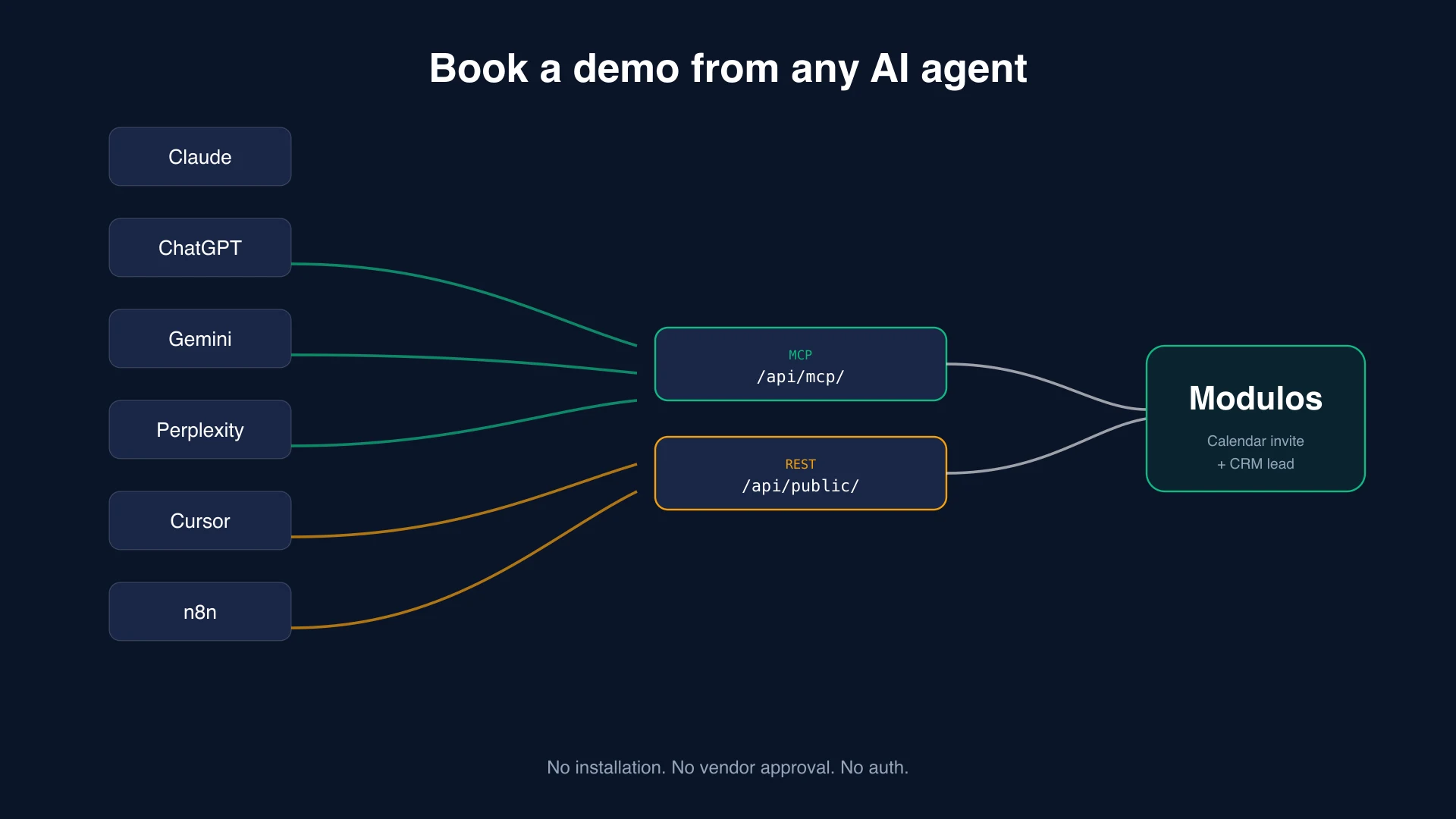
We exposed the same booking capability in two shapes so agents pick whichever fits their stack.
For MCP-capable agents
If your agent speaks the Model Context Protocol — Claude Desktop, Claude.ai with custom connectors, Cursor, Windsurf, Cline, ChatGPT Apps SDK, Gemini with MCP — point it at:
https://www.modulos.ai/api/mcp/
Transport is Streamable HTTP, the current MCP standard. The server exposes four tools:
get_modulos_info— what we do and how to talk to uslist_demo_slots— available 30-minute slots over the next two weeksbook_demo_slot— confirm a specific timerequest_demo— open-ended demo request if no specific time is preferred
Discovery JSON: /.well-known/mcp.json. Full setup guide: /developers/mcp/.
For everyone else
If your agent talks HTTP but does not speak MCP — ChatGPT Custom GPT Actions, Perplexity workflows, n8n, Zapier, Make.com, a Python script, a browser extension — call our REST API directly:
GET  https://www.modulos.ai/api/public/slots/
POST https://www.modulos.ai/api/public/book/
POST https://www.modulos.ai/api/public/request-demo/
OpenAPI 3.1 spec: /openapi.json. Paste that URL into ChatGPT's Custom GPT Actions form and the four operations show up ready to use.
End-to-end booking in five lines
# 1. Fetch available slots
curl https://www.modulos.ai/api/public/slots/

# 2. Pick a startTime, then book
curl -X POST https://www.modulos.ai/api/public/book/ \
  -H "Content-Type: application/json" \
  -d '{
    "startTime": "2026-05-22T07:30:00.000Z",
    "name": "Jane Smith",
    "email": "jane@acme.com",
    "company": "Acme",
    "message": "Interested in EU AI Act compliance for our recommendation engine."
  }'
The booking creates a calendar event, sends an invite, and lands in our CRM tagged source: rest so we know an agent drove it. A human follows up within one business day. From the user's perspective, the experience is identical to filling in the website form, except the user did not have to type anything.
What this unlocks
A typical conversation with Claude or ChatGPT today goes:
User: "Book me a demo with Modulos for next Tuesday morning."
Agent: "I cannot submit a form on your behalf. Here is the link…"
With these endpoints in place, the conversation can be:
User: "Book me a demo with Modulos for next Tuesday morning."
Agent: (calls
/api/public/slots/, picks Tuesday 09:30, calls/api/public/book/with the user's stored profile) "Booked you for Tuesday 09:30 Zurich time. Confirmation in your inbox."
The agent does not need to be "given access" to anything. It just calls a public URL the same way it would fetch a webpage. Trust lives where it should — between the user and the agent, not gatekept by a third-party directory.
What about your data?
Bookings made through these endpoints land in the same CRM the website form writes to. Standard data handling applies — see the privacy policy for details on retention and processing. No additional data is collected because an agent is calling on your behalf instead of a browser. We do tag agent-driven leads in our CRM so we can measure conversion and follow up appropriately, but that tag is internal attribution, not a third-party share.
The endpoints are rate-limited per IP and per email to prevent automated abuse. There is no authentication step because no authentication is meaningfully possible — an MCP server has no user accounts. If you would prefer the form-driven flow, our regular demo page works the way it always has.
What about Claude, ChatGPT, or Gemini specifically?
Each chat product handles "use this endpoint" slightly differently right now:
- Claude Desktop / Claude Code: add
https://www.modulos.ai/api/mcp/as an MCP server in your config, restart, ask Claude to book. - Claude.ai (web): Settings → Connectors → Add custom connector → paste the URL. The four tools appear in subsequent conversations.
- ChatGPT Custom GPTs: create a GPT, go to Actions, paste
https://www.modulos.ai/openapi.jsonas the schema source. The booking operations show up automatically. - Cursor, Windsurf, Cline: same as Claude Desktop — drop the URL into your MCP config.
- Perplexity, Gemini with web tools, any general-purpose agent: ask the agent to call
POST https://www.modulos.ai/api/public/book/directly. The OpenAPI spec gives it everything it needs.
Whichever path the agent takes, the booking lands in the same place.
Closing thought
The open web works because anyone can stand up an HTTPS endpoint and any client can call it. MCP servers are public HTTPS endpoints. There is no protocol-level reason an AI agent should need permission from a vendor directory to call one, any more than a browser needs permission to load a webpage. The remaining friction is product UX inside the chat clients, and that will erode over time.
In the meantime: book a Modulos demo from your favorite AI agent. The endpoint is live.
Quick reference:
- MCP: https://www.modulos.ai/api/mcp/
- OpenAPI: https://www.modulos.ai/openapi.json
- Developer docs: https://www.modulos.ai/developers/mcp/
- Discovery: https://www.modulos.ai/.well-known/mcp.json